How it works
How remote headshots work: one portal, one company look.
Remote Headshots combines live photography with a company portal. Employees choose a time in their own time zone and meet a photographer in their phone's browser. Your team follows every stage, from invitation to finished files, with one agreed look across the company.
Live photographer · Full-resolution phone photos · One company standard
For HR: one view of the whole programme
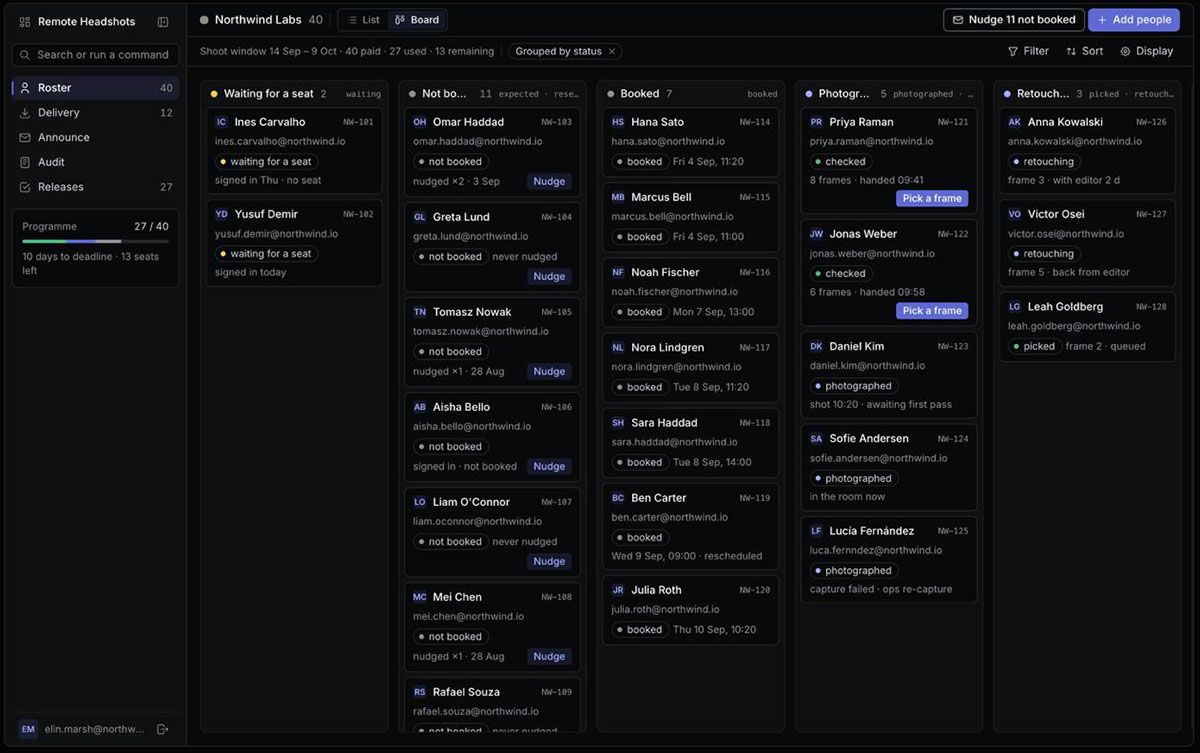
See who has been invited, who has booked, and whose photographs are ready for selection or delivery. Your company portal keeps the roster, reminders and finished files together.
- Follow progress. Track each person's status, programme deadline and used or remaining seats.
- Keep people moving. Send individual or bulk nudges; automatic deadline reminders help employees book in time.
- Manage the result. Review shortlisted frames, coordinate selection and collect the company's finished headshots.
From company setup to finished headshots
- 01
Set up the portal and agree the look
Remote Headshots + your team
We set up your company portal, seats and HR access. Together we agree the background, crop, image ratio and retouching level that will guide every session.
- 02
Invite your employees
HR
Add names and work email addresses. Each employee receives a personal invitation, while your roster shows who still needs to book.
- 03
Choose an appointment
Employee
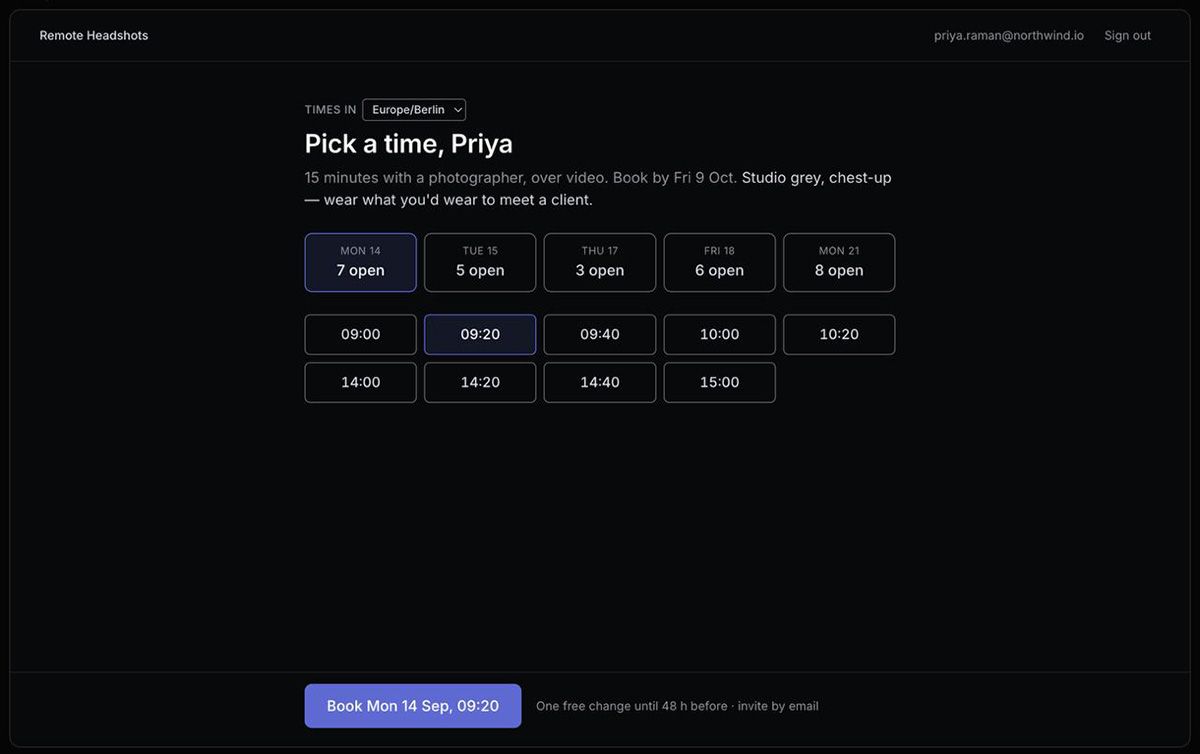
Employees sign in through their work email using a one-time link or code. They choose an available time shown in their own time zone and see the preparation notes for your company's look.
- 04
Meet the photographer
Employee + photographer
Each company session is scheduled for 15 minutes. The employee opens the link in a phone browser and completes the camera check. A photographer guides light, framing, posture and expression, then triggers full-resolution photographs on the phone. Frames upload during the session, and the photographer shortlists the strongest options.
- 05
Choose the frame and finish
HR or employee + our editors
HR or the employee chooses from the shortlist. Editors prepare the selected photograph to the company's agreed finish. Retouching is optional in a company programme and recommended; the scope follows your chosen package and programme agreement.
- 06
Receive files ready for work
HR + employees
The programme provides square, web-crop and master formats of the selected portrait. HR receives a ZIP with a file manifest, and each employee receives their own files by email. The same approved brief can guide future new hires.
The portal is set up after your company programme is arranged. Looking for a single session? Explore individual remote headshots.
For employees: choose a time, then join from your phone
Your invitation takes you to your company's calendar. Times are shown in your own time zone, alongside the deadline and the look your company has chosen. Pick your appointment, follow the preparation notes and open the session link on your phone. There is no app to install for the portal session.
Bring a charged smartphone, a stable connection, a quiet space, usable window light and a steady phone position near eye level. Your photographer helps refine the setup.
Already invited? Portal sign in
A video call guides the session. Your phone takes the photograph.
The photographer directs you over video and triggers your phone's camera remotely. The headshots are full-resolution photographs from the phone, not screenshots from the call. You receive live help with framing, light and expression, rather than having to choose and upload selfies yourself.
One look, from selection to delivery
The company brief stays with the work: background, crop, ratio and finish are agreed once, then used for each person. That helps portraits photographed across offices, regions and later hiring dates fit together.
Every image starts as a real photograph. Editors can correct colour and exposure, apply the chosen background and crop, and use AI-assisted upscaling. The aim is a polished image that preserves the person's facial features and expression, not a generated replacement likeness.
- Square: profiles and internal directories.
- Web crop: team pages and press materials, at your selected ratio.
- Master: presentations, print and your company's image library.
Your package and company programme define the selected portraits, finish and delivery schedule. The formats above are versions of the selected image, not additional frame selections.
Background options · Retouching standards · Headshots for future hires
Common questions
Practical questions
Who organises the appointments?
HR adds the employees to the company portal. Each invited employee signs in and chooses an available time in their own time zone. HR can follow booking progress and send reminders.
Do employees need an app or special camera?
The company portal session opens in a smartphone browser. There is no app to install. A camera check runs before the session, and the photographer helps with the setup.
How long is the session?
Company portal appointments are scheduled for 15 minutes per employee. Allow time beforehand to prepare and complete the camera check. Individual packages have their own session scope; check the individual session details when choosing your package.
Who chooses the final photograph?
The photographer shortlists the strongest frames. HR or the employee chooses the frame, and the selected photograph is prepared to the company's agreed finish.
Is the image generated by AI?
The starting image is a real photograph captured on the employee's phone during a live photographer-directed session. AI-assisted upscaling may be used in finishing; it does not replace the person's face with a generated likeness.
Can new employees match the existing headshots?
Yes. The approved company brief records the background, crop, ratio and finish, so future sessions can follow the same standard as the original team.
Related reading
For a longer side-by-side, read remote headshots vs studio headshots.
Where each format genuinely fits: remote versus an in-person studio day.
For a deeper comparison, see the AI headshots alternative page.
If you are organizing the session rather than sitting for one, our guide to planning a remote team rollout covers the brief, the invitations, and the approvals. You can also read how a distributed startup photographed its whole team in nine days on this same workflow.
Ready to plan
Bring your team's headshots into one programme.
Start with a team or company rollout. We can establish the look with a pilot, then plan sessions across departments and regions.